Email Template Size: Practical Limits That Work in 2026
Gmail's desktop HTML clipping threshold is about 102 KB, but mobile clients can clip far sooner, so a safe working target is materially lower than 102 KB. Treat email template size as a device-aware budget, not permission to fill the desktop allowance.
The popular advice to stay below the desktop limit misses the actual booking problem. A podcast host needs to see why your guest fits, who's contacting them, and how to respond. If those details sit behind a clipping notice, a polished pitch can arrive without a visible next step.
Table of Contents
- Why One Size Number Is the Wrong Way to Think About Email Template Size
- What Actually Counts Toward Gmail's 102 KB Clipping Threshold
- Desktop vs Mobile Clipping: Where Templates Break
- A Working Byte and Character Budget for Outreach Templates
- Matching Template Length to Outreach Use Case
- How MIME Encoding and Markup Quietly Inflate the Final Size
- A Pre-Send Checklist to Keep Your Template Inside the Budget
Why One Size Number Is the Wrong Way to Think About Email Template Size
Being under the desktop limit isn't proof that your email is safe. Gmail's clipping behavior varies across desktop and mobile, so a template can pass a desktop check without displaying completely on a phone. Stripo's email-clipping guidance supports treating size as a rendering problem rather than a universal file-size rule.
For podcast outreach, that distinction matters more than visual polish. You're not sending a brochure that recipients have already agreed to read. You're asking someone to assess a potential interview and decide whether to continue the conversation.
Clipping can hide the part that makes that decision actionable: your call to action, contact details, or scheduling link. Don't assess a template only by whether the opening looks good. Assess whether the recipient can complete the booking step without opening an expanded version of the message.
Budget for the action, not the decoration
Build your template around what the recipient needs to decide. A recent-episode reference establishes context, a proposed topic establishes relevance, and a direct request establishes the next step. A long biography and branded header are secondary.
Use these priorities when allocating space:
- Protect the decision-making content. Keep the proposed interview angle and response request ahead of supporting material.
- Allow room for substitutions. A template must accommodate the actual guest bio, episode reference, and destination links.
- Remove optional modules. Don't send testimonials, social icons, and multiple topic menus merely because the editor includes them.
Practical rule: A pitch isn't complete unless the recipient can see both the reason to book and the way to respond.
Review podcast pitch examples for message structure, then apply your size budget to the version you'll send. Borrow the order of information, not every decorative element.
The right question isn't whether your template falls below a famous threshold. It's whether the essential booking content survives the recipient's reading environment.
What Actually Counts Toward Gmail's 102 KB Clipping Threshold
Gmail's approximately 102 KB desktop clipping threshold is a limit on the assembled HTML, not the apparent length of a message. That includes the text, styles, links, tracking markup, and tables. Externally hosted image files generally sit outside that allowance, as Bird's explanation of Gmail clipping describes.
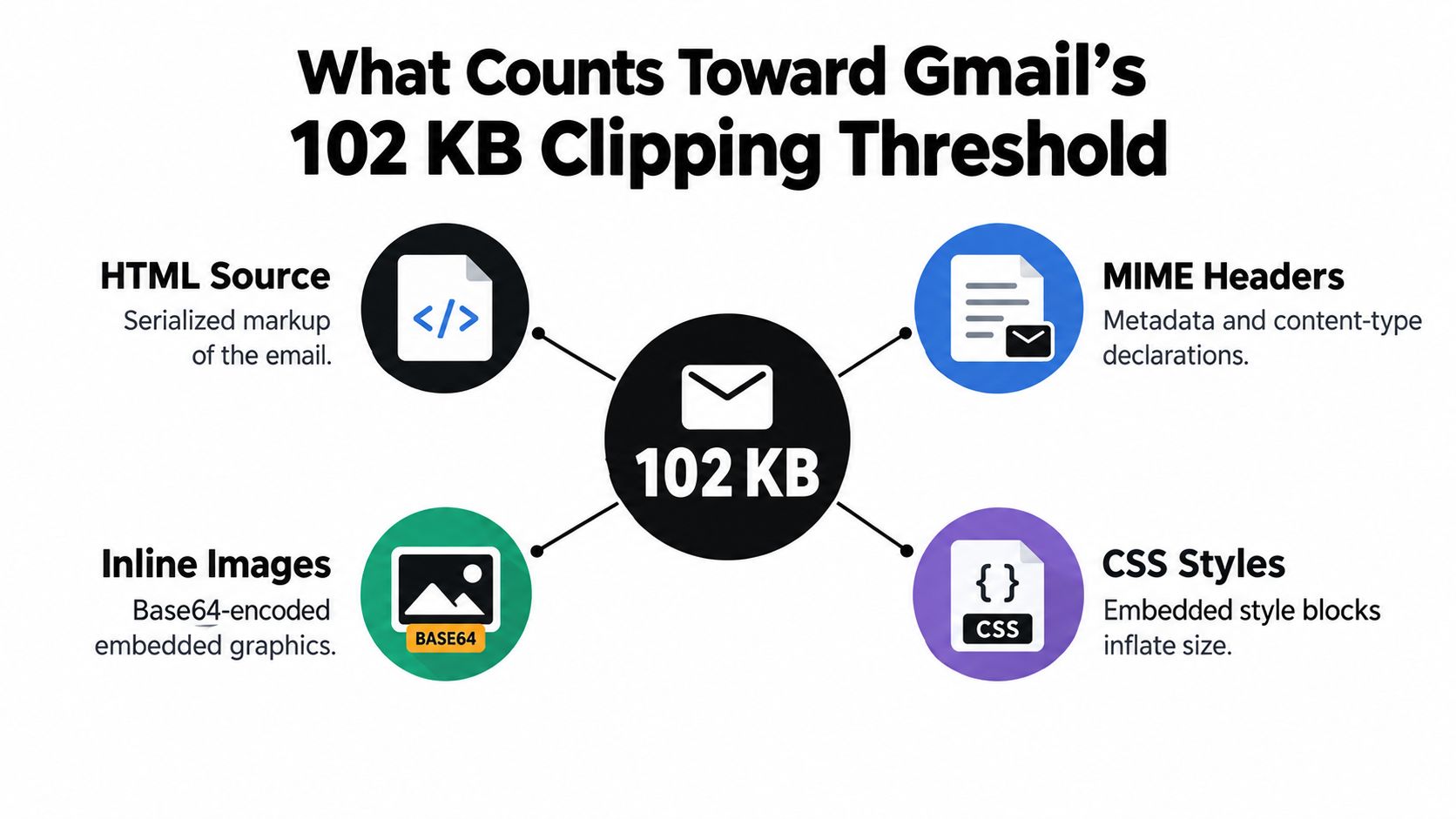
Removing a hosted photo may save little HTML. You remove its reference and surrounding markup, not the image file. A short-looking pitch can still carry heavy formatting code, and clipping can hide the booking link or signature along with the message's ending.
Keep two measurements separate: assembled HTML and complete MIME message. The HTML body is the key measurement for clipping. The sent MIME message shows what the sending system adds or changes before delivery.
Inspect the finished template by component:
- Visible content and structure: pitch copy, signature, headings, tables, and links.
- Formatting code: repeated inline styles, unused blocks, and nested layout markup.
- Tracking additions: rewritten links and tracking-pixel markup added by the sending system.
- Embedded content: inline data, especially images stored in the HTML rather than hosted elsewhere.
A recipient-specific episode reference can earn its place; duplicated styling cannot. Cut code that adds weight without helping the guest understand the booking request or respond. Preserve the call to action, signature, and scheduling link in the visible portion of the message.
Ask the person responsible for the email builder to expose the final assembled HTML. An editor's word count helps trim copy, but it cannot confirm the template's size. Check the actual output before sending, since that is the version whose hidden markup can push the booking details below Gmail's clipping point.
Desktop vs Mobile Clipping: Where Templates Break
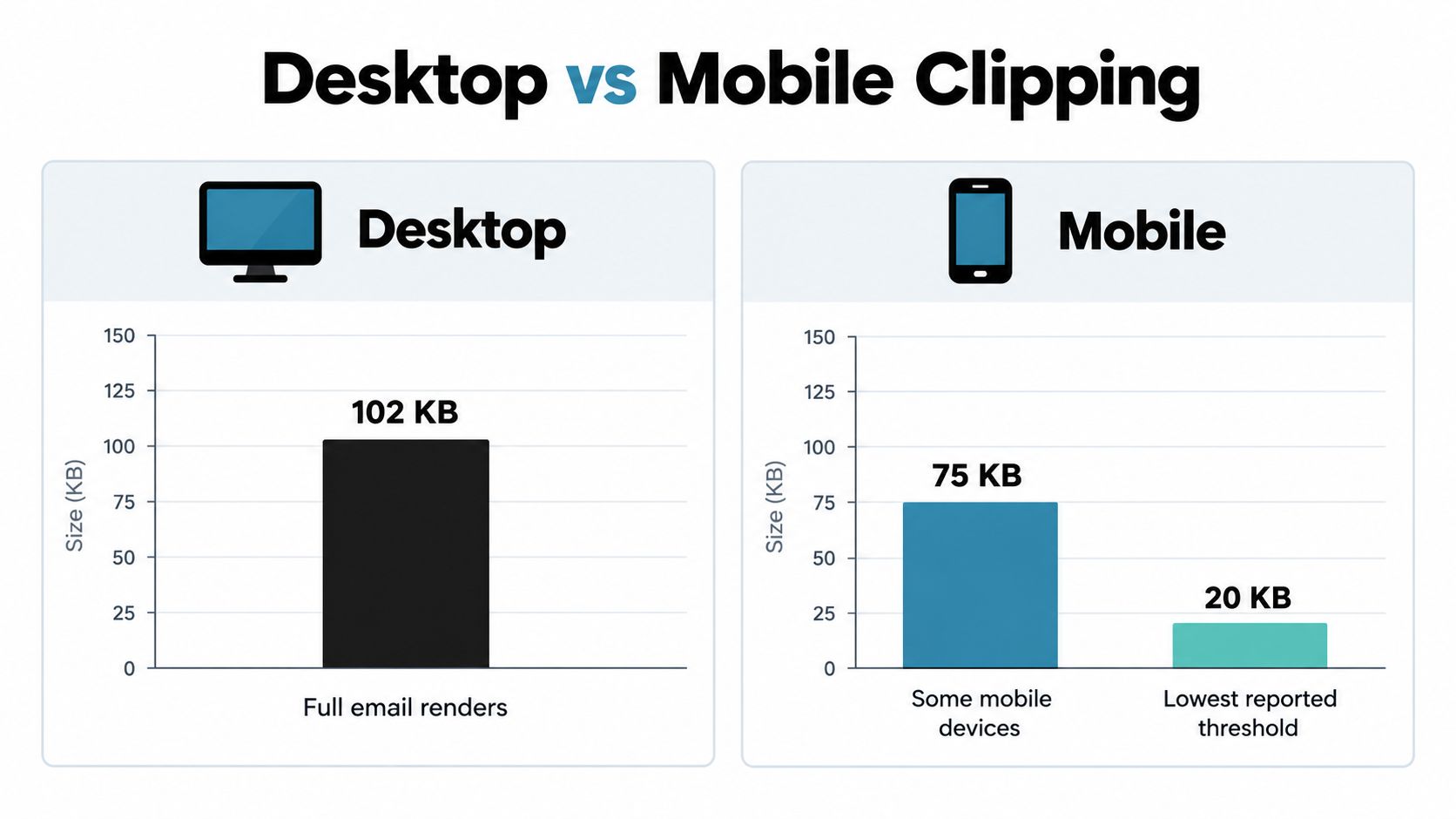
A desktop Gmail test can pass while a mobile reader loses the end of your pitch. Bird reports clipping around 75 KB on some mobile devices and as low as approximately 20 KB in some iOS Gmail cases, with the lower iOS behavior described as inconsistent. Treat these as reported behaviors, not universal limits for every phone. Bird's desktop and mobile clipping guidance explains the differences.
That uncertainty makes mobile testing more important, not less. A clipped message can hide the call to action, signature, or booking link, even when the desktop version looks complete.
For a cold guest pitch, use a text-led template rather than a newsletter-style layout. The recipient needs a clear interview proposition, not a large design system. Keep compatibility code only when it earns its place.
Test the sent production version on desktop Gmail and the Gmail apps on your actual test devices. Include real personalization and the tracking configuration you plan to use. An editor preview can show layout problems, but it cannot confirm what the delivered message looks like.
Read the message without expanding it. Can the recipient understand the proposal? Is the response request and scheduling link visible? Can they identify the sender from the signature and contact details?
A desktop pass is a desktop result. Don't turn it into a mobile guarantee.
If the test clips, remove optional content and redundant structure before reducing font size. Preserving every module by making the email harder to read is the wrong trade-off.
Block deployment after any mobile failure. Simplify the template, send it again, and confirm the booking link and signature remain visible. A desktop pass does not excuse a mobile message that conceals the next step.
A Working Byte and Character Budget for Outreach Templates
Set the budget against the final message, then give the template room to grow. Don't write to the edge of the desktop allowance. Personalization, link rewriting, and client-specific blocks need space inside your working limit, not beyond it.
Keep the budget beside the draft while you edit.
There's no defensible universal character limit for podcast pitches. Characters aren't bytes, and visible copy isn't the whole template. Use content boundaries for the writing and a measured HTML ceiling for the technical budget.
Give each part a clear job
- Subject line. Name the relevant topic or invitation plainly. Remove stacked credentials and promotional wording.
- Opening. Explain why this particular show or guest belongs in the conversation.
- Body. Propose a focused interview angle and include only the credentials needed to support it.
- Action and signature. Make the request explicit, then identify the sender without a long promotional footer.
Test the longest realistic substitutions, not only the shortest sample data. If a guest's biography grows, use a concise credential in the email and move the complete profile elsewhere. Don't let merge fields turn a lean draft into a miniature media kit.
For the visual budget, use a single-column layout, readable text, clear contrast, descriptive alternative text, and comfortably tappable links. Verified.email's discussion of mobile usability and accessibility highlights why template sizing also needs to account for readability, not just file weight.
Use the video as a companion while reviewing your template workflow.
Your working budget should record the tested HTML size, the personalization used, and the clients checked. Don't record only a character count and call the template approved.
Matching Template Length to Outreach Use Case
A cold pitch and a confirmed interview handoff shouldn't use the same template. Match length to the decision the recipient is ready to make. An unfamiliar host needs enough context to judge fit; a booked guest needs the details required to prepare.
I'd start cold outreach with the shortest structure that makes a credible proposal. For a warm follow-up, add only the context needed to reconnect the conversation. Reserve longer messages for recipients who already expect logistics or preparation material.
Outreach Template Lengths by Use Case
| Template Length | Target HTML Size | Best Use Case | Reply Likelihood |
|---|---|---|---|
| Short | Lowest practical weight, with substantial tested headroom | Cold guest pitches and host invitations | Best starting point for a low-effort decision; no guaranteed response advantage |
| Medium | Lean modular body within the mobile-tested budget | Warm follow-ups and requested topic clarification | Depends on whether the added context resolves a real question |
| Long | Within the same tested ceiling, with detailed assets hosted elsewhere | Booking confirmations and interview preparation | Prior agreement matters more than length; not a cold-outreach benchmark |
These are editorial recommendations, not response-rate findings. Length alone can't predict replies. A compact generic message is still generic, and a longer relevant message may be appropriate when the recipient requested detail.
Add information only when it changes the next step
For cold outreach, retain the show-specific reference, proposed topic, relevant credential, and clear request. Remove the career history unless that history is the interview angle. Don't ask the host to select among unrelated topics before they've expressed interest.
A warm follow-up should reconnect the recipient with the original proposal, not reproduce the entire pitch beneath a new introduction. Add something useful, such as a clearer topic framing or an answer to a previous question. Otherwise, keep it brief.
For confirmed bookings, make the recording arrangements and preparation instructions easy to find. Use interview scheduling email guidance to organize the handoff, while linking out to extensive research or background material.
Editorial test: Keep a sentence if it helps the recipient decide, prepare, or respond. Move it elsewhere if it merely makes the sender sound impressive.
Longer messages earn their place through recipient need. They don't receive a larger technical allowance.
How MIME Encoding and Markup Quietly Inflate the Final Size
A message can exceed its intended size even when the copy is short. The editor preview doesn't show the full payload your sending system delivers. MIME content-transfer encodings, including quoted-printable and Base64, convert content into transport-safe representations and can increase its size. RFC 2045's definitions of MIME transfer encodings explain how those transformations work.
Keep encoding and template bloat separate. Encoding changes how content is represented; redundant markup adds code that serves no purpose. Cutting useful words won't fix oversized layout code, and stripping compatibility rules can break the message on supported clients. Both issues need inspection because a clipped email can hide the booking link, call to action, or signature.
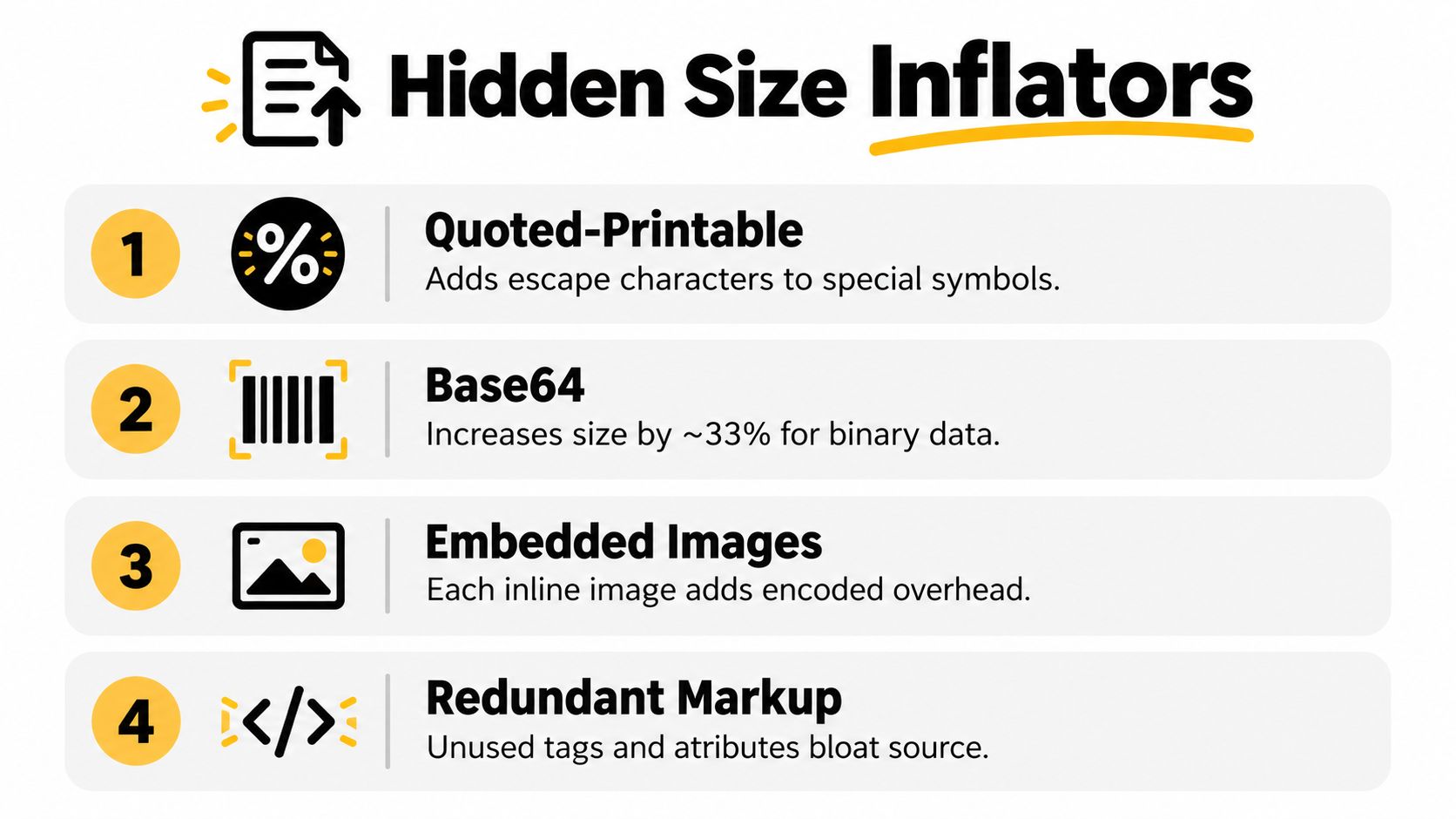
Measure the message recipients receive. Compare the assembled HTML with the sent MIME body after personalization, tracking, and encoding. That reveals whether the extra bytes come from your template or the sending process.
Check these common sources of growth:
- Inline image data. Use hosted assets for necessary graphics instead of embedding their data in the message.
- Repeated styling. Remove unused declarations and duplicated formatting while keeping code needed by the email clients you support.
- Expanded destination links. Check tracking parameters on every link, including those in your signature and social profiles.
- Leftover template blocks. Delete unused modules rather than hiding them visually.
An HTML email template generator can speed up drafting, but its output still needs review against your pitch and sending workflow. Generated markup is not automatically lightweight.
Save a copy of the approved sent message as your baseline. When a revision grows, compare the versions and identify the added code before cutting useful outreach details. Keep the recipient's next step visible, even on a smaller screen.
Remove redundant markup, send a test, and check the layout again. The target is a message that renders correctly and keeps its booking path intact, not the smallest possible file.
A Pre-Send Checklist to Keep Your Template Inside the Budget
Approve the sent version, not the editor preview. A clean draft is only the beginning of a usable outreach email. Run the checks with production substitutions, actual destination links, and the sending settings you'll use for the campaign.
Check the message and the booking path
- Compile realistic content. Include the longest expected personalization and any conditional blocks.
- Inspect unnecessary code. Strip duplicated inline styles, abandoned modules, and avoidable tracking parameters.
- Verify the action placement. Confirm that the proposal, response request, scheduling link, and compact signature appear before optional supporting material.
- Measure the output. Record the assembled HTML size and inspect the final MIME message for unexpected growth.
- Receive real tests. Check desktop and mobile Gmail, then follow the booking path from the received message.
- Keep contact controls usable. Confirm that contact and applicable unsubscribe information remain visible and functional.
Keep large assets outside the email
Attachments have a separate transport constraint. Microsoft lists common caps of approximately 20-25 MB, with Outlook and iCloud commonly at 20 MB and Gmail, Yahoo, Proton Mail, and AOL commonly at 25 MB; encoding reduces practical raw-file capacity to roughly 75% of the stated limit, according to Microsoft's guide to sending large files.
Don't treat those attachment allowances as a budget for your pitch. Share guest one-sheets, headshots, media kits, and sample audio through hosted links instead. Check that the recipient can open those assets without requesting access.
Keep the essential interview proposition in the email itself. The hosted profile should support the pitch, not contain the only explanation of why the guest belongs on the show.
A template is ready when the recipient can understand the invitation and complete the next step in the tested inbox environments. If either fails, revise before sending.
Let's Make A Podcast connects hosts and prospective guests through a podcast marketplace, shareable one-sheet profiles, pitching tools, and scheduling. Visit Let's Make A Podcast to find relevant interview opportunities, move supporting details into a shareable profile, and keep your outreach focused on a clear booking request.